
How to Change Your Name On Facebook

If you want to change your name on Facebook, the process is pretty straightforward. There are some restrictions that Facebook has long had in place on what you can actually use as your name.
How to Change Your Facebook Name
To change your name, do the following:
Go to Settings.

Under General Account Settings > Name, click Edit.

Enter what you want to use for first name, optional middle name, and last name and click Review Change.

Facebook will prompt you to choose how you want your name to appear.
Make your selection, enter your password, and click Save Changes.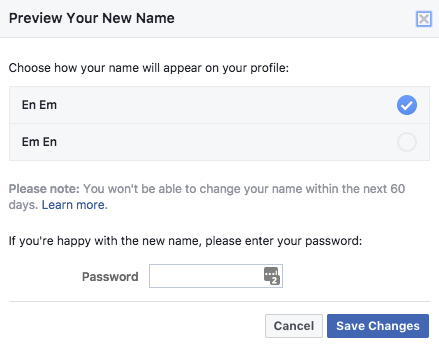
The name change should take effect immediately, but note that Facebook will review it and you may be asked why the change was made. If it doesn’t adhere to the requirements listed below, you may not be able to change it.
Restrictions on Changing Your Facebook Name
So what are these restrictions that Facebook has put in place?
You aren’t able to use any unusual capitalization, punctuation, characters or random words.
You can’t use characters from multiple languages. (But you can enter your name in a non-Latin alphabet if you choose to.)
Don’t include your title.
Don’t use words or phrases in place of a name, including offensive or suggestive words.
How to Change Your Facebook Name
Facebook also suggests that you use the name your friends call you in everyday life. Their guidelines specify that the name should appear on an ID or document listed here. The list is flexible enough that some of the documents could potentially include a nickname you use, rather than just your name as it appears on your official ID.
On the topic of nicknames, Facebook actually specifies that they can be used as a first or middle name if they’re a variation of your real name (i.e. Bob instead of Robert).
How to Change Your Facebook Name
You can only change your name on Facebook every 60 days.
If you choose a name that requires confirmation, Facebook says you may temporarily lose access to some features while the change is confirmed. That confirmation also requires you to submit a form of ID or mail displaying that name.
After you change your name on Facebook, you might also want to try a few other


No comments:
Post a Comment